
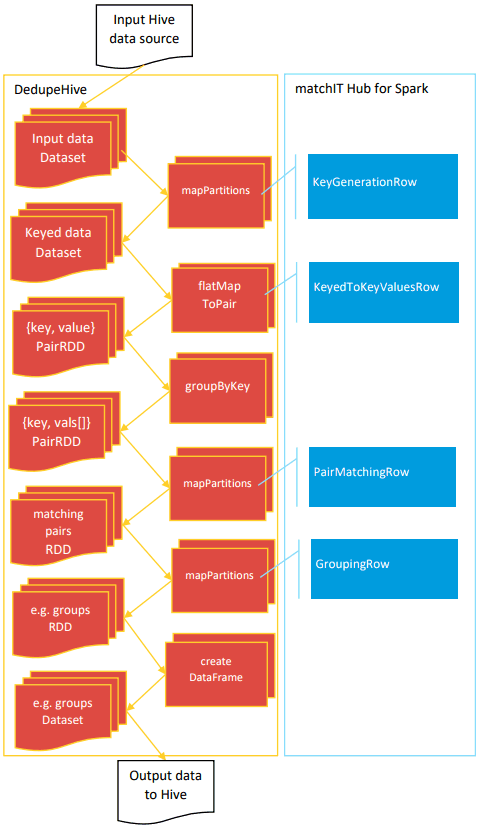
The DedupeHive application demonstrates using the Syniti Match API for Spark ‘Row’ classes to work with a Hive datasource, Rows, and Spark Dataset & RDDs.
Configuration
The command line argument to DedupeHive is the name of a configuration file. This is an xml file in the following format:
<?xml version="1.0" encoding="utf-8" ?><config><dedupeHive><warehouseLocation>/user/hive/warehouse</warehouseLocation><!-- Define one input for single table Matching --><input><table>input</table></input><!-- Define two inputs for Overlap Matching<input></input> --><!-- Output database and table name. --><output><table>matchingPairsSpark</table></output><delimiter>\t</delimiter><licenceFile>./activation.txt</licenceFile><logLevel>error</logLevel><groupingAlgorithm>hub</groupingAlgorithm><idField>0</idField><maxIterations>4</maxIterations></dedupeHive><hub><data><input table="0" columns="|UniqueRef|FullName|Company|Address1|Address2|City|State|Zip" /><options>...</options></data><matching><outputs>...</outputs></matching><threads>0</threads><advanced><nationality>USA</nationality></advanced></hub></config>
The <dedupeHive> section is specific to this application.
| warehouseLocation | Location of the Hive warehouse. |
| input | Details of an input database table. |
| table | The name of a database table. |
| output | Details of an output database table. |
| delimiter | The delimiter used when converting records to delimited string in order to pass to the underlying matching engine. |
See DedupeConfiguration for a description of the configuration options: licenceFile, logLevel, groupingAlgorithm, idField, and maxIterations.
The <hub> section configures the underlying matching engine. Refer to the Syniti Match API documentation for details. The <hub> section must contain the following sub-sections: data, matching, threads, advanced.
Running the sample
The DedupeHive sample can’t be run out-the-box like the DedupeTextFile sample because it requires a Hive database source. Nevertheless, a sampleconfig.xml and run.sh are provided to demonstrate how to set this up to run.