I need to have DSP execute a PowerShell command on the DSP server. Does anyone know how to do this? I want to drive it by the click of a button and/or a Service page.
-
CBermingham:
If you have permission to use xp_cmdshell, you can call the PowerShell script directly from a SQL Server stored procedure. Ensure that the DB process has the right to execute files wherever the script lives and to any other resources that the script uses.
Here are 2 examples:
0 -
EWeldon: I’ve executed batch files in the past using the procedure: Cransoft..boaJobAddCommandTask
0 -
Eric Weldon Can you please share more details on how you were able to execute batch files using Cransoft..boaJobAddCommandTask? I have a similar requirement to call a powershell script and I am checking for options to do this from DSP.
0 -
Hi Balaji,
There are two options to do this: One via Automate (previously known as Interface Server) and via a Cransoft Job (as I mentioned above).
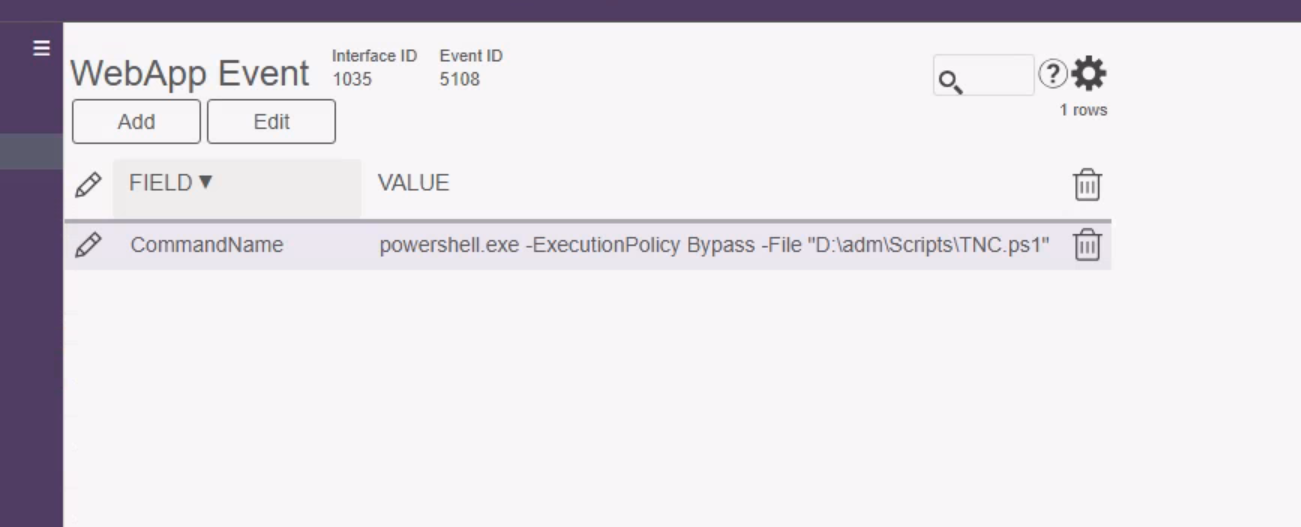
To do this in Automate:
1) Navigate to Automate and create a new interface
2) Add a an event
Set the Page to "InterfaceServer : Parameters"
Set the Event to "CommandExec"

Add a "CommandName" parameter with the location of your PS script (needs to be on the DSP Application server)

To do this in a Cransoft Job (be sure to update the variables appropiately):
/*=============================================================================Create Job=============================================================================*/DECLARE @JobID BIGINT, @TaskID BIGINT, @JobGUID UNIQUEIDENTIFIER, @CTSItemID UNIQUEIDENTIFIER, @QueueID UNIQUEIDENTIFIER, @WebAppID UNIQUEIDENTIFIER, @PageID UNIQUEIDENTIFIER, @Title NVARCHAR(50), @ParamName NVARCHAR(50), @Event NVARCHAR(50), @GroupID UNIQUEIDENTIFIER, @CommandObject NVARCHAR(250)
SELECT@QueueID = 'F2871101-4ED0-4EAD-A020-4DE6CF407728',@Title = 'Admin: RunBatchJob',@PageID = 'A11F0B41-AB99-47A8-9783-13D97034E6A0',@Event = 'RunBatchJob',@CommandObject = 'D:\BOA\RunBatchJob.bat'
/*=============================================================================Create the Job and add any needed tasks to itFor a Page Event, use the boaJobAddEventTask.If it takes inputs, be sure to specify 'Key.' + Parameter Name (Column Name)when calling boaJobAddTaskParamFor a Stored Procedure, use boaJobAddStoredProcedureTaskIf it takes inputs, do NOT specify 'Key.' + Parameter Name (Column Name)=============================================================================*/SET @JobGUID = NEWID()
EXEC Cransoft..boaJobCreate @JobID = @JobID out, @QueueID = @QueueID, @WebAppID = @WebAppID, @Title = @Title, @Group = NULL, @HaltOnError = 0, @JobGUID = @JobGUID
EXEC Cransoft.dbo.boaJobAddCommandTask@JobID = @JobID,@CommandObject = @CommandObject,@TaskID = @TaskID OUTPUT
/*=============================================================================Kick off the Job=============================================================================*/EXEC Cransoft..boaJobStart @JobID = @JobID
GO0 -
Thanks Eric Weldon for sharing the details.
I got my main script working via powershell. When I try to call powershell script using in a Cransoft job method I get an error as below (also attached).
"The specified executable is not a valid application for this OS platform. Job Task Parameters: Stack Trace: at CranSoft.RuntimeInterface.Service.JobProcessor.ExecuteTasks(JobQueue job, Boolean errorHandler, Boolean breakOnError, Guid serviceId, Guid processorID) at CranSoft.RuntimeInterface.Service.Jobs.ProcessTaskExecutor.OnExecute() at CranBerry.Framework.Diagnostics.ProcessInvoker.StartAndWaitForExit() at System.Diagnostics.Process.StartWithCreateProcess(ProcessStartInfo startInfo)"
During the job creation it prompted an error for @WebAppID being null. So I was using WebAppID = '90EAC1AE-BFAF-43F7-B3A1-83CC37045878' which is InterfaceServer. Not sure if I had to use a different one please advise.
Then I created a batch file to call the same powershell script and executed the steps to create Cransoft job declaring the @CommandObject = 'E:\DSP\Ariba.bat'. The job executed successfully as per JobQueue status but the I didn't get the expected result. Not sure if I am missing something.
Alternatively I tried the 1st method to create an Interfaces job in Automate with Even type as WebApp and Page ID as InterfaceServer : Parameters and Event as CommandExec. When I go to set parameters for the WebApp Event I only get field named 'One' and not 'CommandName' for some reason. I still get the value with the command to call the powershell and execute the job and it failed with error as below
"External Process Exception in CommandExec Class in C:\Program Files (x86)\BOA\DSP\Web\UserArea\90eac1ae-bfaf-43f7-b3a1-83cc37045878\Processes\Izzy.dll. Error Message: CommandName is empty".
Is this an option only in newer version? We are on 8.0.7.58.
Much appreciate any assistance.
0 -
Hi Eric Weldon
I have resolved the error with "CommandName is empty". For some reason I completely missed I could type the field name and I was relying on drop down. That has resolved the issue.
I have identified the issue with the Cransoft job as well and its working as expected. I can get both the methods working.
Thanks for sharing the details.
0
Please sign in to leave a comment.
Comments
6 comments